
Aloha,
Welcome to the November 2026 E-Construction Newsletter! In this edition, we’re sharing key reminders, newly released tools, and updated workflows designed to streamline your day-to-day tasks. Keep reading for the latest updates from our core platforms and upcoming training opportunities to support your work.
- Recent Trainings/Office Hours
- E-Construction Project Onboarding
- Autodesk Forma Updates
- Haulhub Updates
- HeadLight Updates
- HDOT Wiki Site Updates
1. Archived Trainings/Office Hours
If you need to find a specific training topic, you may do so easily by using the search bar on the HDOT Wiki. To view the recordings of all the trainings, from new to old, check here:
If you are not invited to the office hours meeting invite for the above trainings, please reach out to econ@qrse.com.
Are there any specific topics you’d like to focus on more during office hours? If so, please fill out the form here!
2. E-Construction Onboarding for New Projects
For Autodesk Forma, projects should be created by the construction project manager/engineer at the beginning of the construction phase. If at the construction phase there has not been a project created yet, you can still follow the wiki post for Project Setup to create it in Autodesk Forma. For any members that need to be added/removed, have them contact the PM/PE to be added.
REMINDER: Assigning the correct roles in Autodesk Forma is an essential part of project setup. Please take a moment to confirm that members have the appropriate roles and that access permissions have been assigned correctly by project administrators.
For HeadLight, new projects should be requested through HeadLight’s project intake form here. To add/remove members to a project, send an email to support@headlight.com with your name, email address, role, and project that you want to be added to. Be sure to CC the PM/PE on the email request.
For HaulHub, new projects in E-DOT should be requested through the project creation form here. You should also remind the prime Contractor on your job that they need to create the project in their portal. In addition to that, the Contractor should have the supplier reach out to alex.richardson@haulhub.com to get onboarded to Haulhub’s supplier system (if not already onboarded). All projects must be using E-DOT to track material tickets.
Please reach out to the e-construction support email (econ@qrse.com) if live onboarding training is needed for a specific project.
3. Autodesk Forma Updates
The most recent update to Autodesk Forma was in September, which was covered in the previous edition of this newsletter. The next update is anticipated to release later this month, so stay tuned for more details in the next newsletter. For a full list of recent updates to ACC and other resources, visit the official help website.
4. Haulhub Updates
Aloha HDOT Team,
Welcome to the November 2026 edition of the Haul Hub Newsletter, your one-stop source for e-Ticketing updates, portal enhancements, and expert tips to streamline your EDOT experience!
Our mission? To keep you informed, empowered, and connected as we drive e-Ticketing adoption across the islands. This newsletter is yours, so we’d love your input: what topics or features would you like to see? Share your ideas with us!
🚀 Supplier Integration Highlights
Big mahalo to our 9 onboarded suppliers:
✔ Grace Pacific
✔ HC&D
✔ Hawaiian Cement
✔ Halawa Asphalt
✔ Hawaii Paving
✔ Island Ready Mix
✔ Kauai AC Plant
✔ Maui Asphalt
✔ Makakilo Quarry 2
📌 Coming Soon: Jas Glover, Kauai Concrete, and Yamada & Sons are next in line! If your project uses a supplier not yet integrated, let us know it helps us prioritize.
📍 NEW FEATURE SPOTLIGHT
Stationing Is Available in EDOT!
More precise project location data. Better visibility. Smarter workflows.
Stationing is now available in your EDOT Portal as of October.
With Stationing, your team can now connect e-Tickets to specific locations along a project, giving you a clearer picture of where materials are being delivered and placed.
What this means for your team:
- 📍 Add stationing information to your projects
- 🎫 Associate e-Tickets with specific locations
- 📊 Improve the accuracy and value of your project data
- 🔄 Make it easier to track material placement throughout the project
Ready to get started?
Log in to your EDOT Portal and start using Stationing on your projects today!
If you are interested in using this feature please and/or you have any questions please reach out to Alex and Tre.
📊 EDOT by the Numbers
(Jan 1, 2025 – October 31, 2026)
✅ 14,081 Total Tickets Processed
✅ 27 Projects Calibrated
✅ 224 Inspectors in HDOT Portal
✅ 9 Suppliers Actively Sending Data in 2026
Material Breakdown:
🔹 HMA: 7,277 (51.68%)
🔹 RMC: 3,062 (21.75%)
🔹 AGG: 3,742 (26.57%)
🚨 CONTRACTOR REMINDER
Make Sure Your Suppliers Know It’s a State Job
Accurate e-Tickets start with clear communication.
When working on a state project, it’s important to clearly communicate this requirement to all of your material suppliers before deliveries begin.
Your suppliers need to know that the project is a state job to ensure the tickets are generated with correct data [i.e. HDOT project name & number].
Why This Matters
Avoid Rework
Incorrectly generated tickets can create additional work for contractors, suppliers, and inspectors to correct the data later. If you have any questions and/or need help, please reach out to Alex at Haul Hub [alex.richardson@haulhub.com].
🛠️ : Unlocking more features in 2026! With the continued rise in the inspected percentage, it’s clear the foundation has been set to unlock additional feature opportunities. If you’d like to set up a training to discuss other features in your portal that have yet to be utilized, like Work Zone Safety or Connected Equipment, feel free to reach out to me at alex.richardson@haulhub.com to schedule a day/time. Or you can use this link to visit our online learning portal [Haul Hub University] with video tutorials on everything EDOT.
📣 Your Voice Matters
- Have questions or suggestions? Want to highlight a win or challenge? We’re all ears! Drop us a line or join our next feedback session.
🎉 INSPECTION SUCCESS
A Great Comeback! We’re Back Above 95%!
Teamwork makes the difference.
A big congratulations to everyone for the outstanding response and renewed focus on e-Ticket inspections!
After experiencing a temporary dip to 88% inspected, the team stepped up, responded to outreach, and worked together to get things moving in the right direction. We’re excited to share that we’ve climbed back to 95.83% inspected!
📈 Momentum Is Back — Let’s Keep It Going!
This is a great example of what we can accomplish when everyone stays engaged and focused on the goal. Thank you to everyone who took action, followed up on outstanding tickets, and helped bring our inspection rate back up.
Now, let’s keep that momentum going and make 100% our next milestone!
Every ticket matters, and every inspection brings us one step closer.
Hana maikaʻi!
Mahalo nui loa for your continued commitment and hard work!
Mahalo for being part of the e-Ticketing ʻohana.
5. HeadLight Updates
This month’s highlight: Offline Login
For situations where you have low or no connectivity, you can login offline in the iPad (Fieldbook) or iPhone (Fast Capture) apps. These apps are designed to manage your connectivity in these situations to try to avoid unnecessary syncing or draining of the device battery, but sometimes you may want to specifically login offline to control this yourself. To login offline, you can do the following:
1. If already logged in, tap your initials in the upper right and then click Logout. Go to the HeadLight Fieldbook or Fast Capture Login screen.
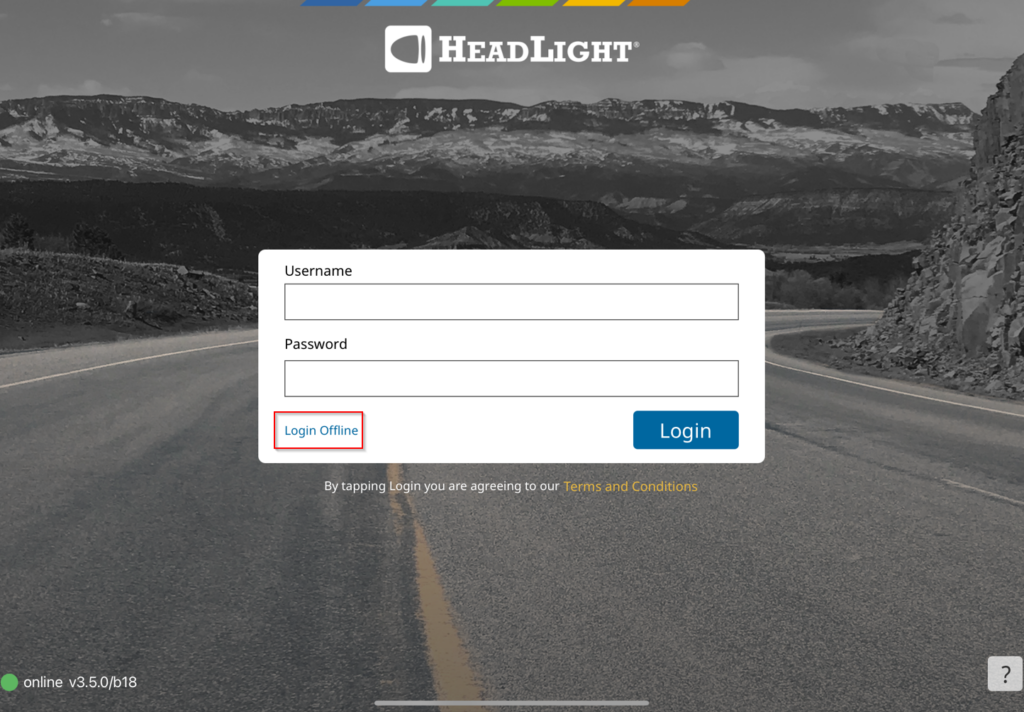
2. Click the Login Offline button in the lower left.
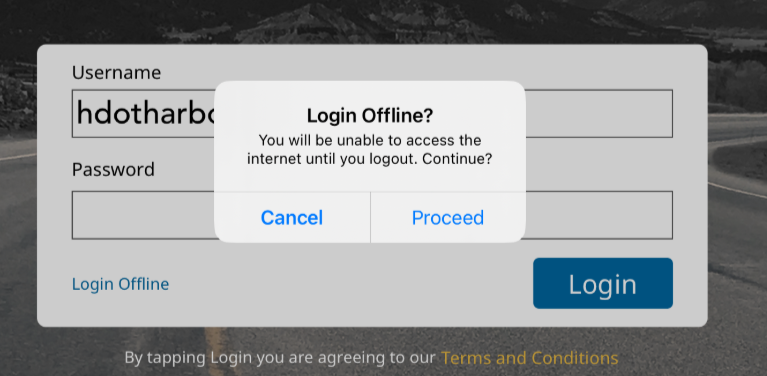
3. You will get a confirmation message asking if you want to login offline. Click Proceed.
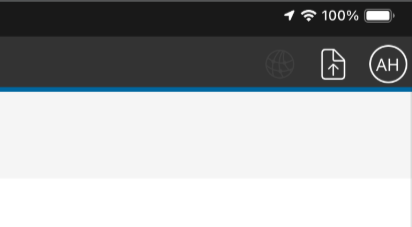
4. This will take you into the app and allow you to record data as you normally would but without syncing. You will notice in the top right that the globe that is usually red or green to indicate your connectivity will now be grey.
5. Once you are back to an enviroment with good connectivity (ideally wifi) you will need to log out and log back in again in an online status to ensure everything that you have captured is able to sync.
6. HDOT Wiki Updates
As part of our mission to make the HDOT Wiki site the best possible resource for all of us, we have worked to update it with all the latest information and resources. New pages have been added and old pages are being kept up-to-date. Here are some of the new pages that have been added since the last newsletter:
- Contractor Overtime Tracking (Inspector, Engineer)
- Environmental Permitting Coordination (Engineer)
- Utility Agreements and Commitments (Engineer)
- Lane Closures and Traffic Control (Engineer)
To access these resources, you must have an account with the appropriate role on the Wiki. As a security measure, the registration page requires a password to access. To request the password, please email econ@qrse.com with a message containing your name, company, and role from the following:
- Project Engineer
- Inspector
- Surveyor
- Planning
- Design
- Contractor
- O&M
- Resident Engineer / Construction Manager
If necessary, you can pick multiple roles that are relevant to your work. After we confirm your request, we will send you the password to use here: https://hdot.wiki/register/
After entering the password, follow the prompts and enter your information. We will then approve your account and you will have access.
For more information on navigating the Wiki and finding the resources you need, please refer to this video: How to Navigate Through the HDOT Wiki
Thank you for reading, and see you in the next newsletter!