
Aloha,
Welcome to the July 2026 E-Construction Newsletter! In this edition, we’re sharing key reminders, newly released tools, and updated workflows designed to streamline your day-to-day tasks. Keep reading for the latest updates from our core platforms and upcoming training opportunities to support your work.
- Recent Trainings/Office Hours
- E-Construction Project Onboarding
- Autodesk Forma Updates
- Haulhub Updates
- HeadLight Updates
- HDOT Wiki Site Updates
1. Recent Trainings/Office Hours
- June 2026 HaulHub Updates
- FHWA-1273 Field Compliance for Engineers
- Checking Contractor Means and Methods
- Environmental Permits in the Construction Phase
- Certificate of Insurance Review
To view the recordings of all the trainings, from new to old, check here:
If you are not invited to the office hours meeting invite for the above trainings, please reach out to econ@qrse.com.
Are there any specific topics you’d like to focus on more during office hours? If so, please fill out the form here!
2. E-Construction Onboarding for New Projects
For Autodesk Forma, projects should be created by the construction project manager/engineer at the beginning of the construction phase. If at the construction phase there has not been a project created yet, you can still follow the wiki post for Project Setup to create it in Autodesk Forma. For any members that need to be added/removed, have them contact the PM/PE to be added.
REMINDER: Assigning the correct roles in Autodesk Forma is an essential part of project setup. Please take a moment to confirm that members have the appropriate roles and that access permissions have been assigned correctly by project administrators.
For HeadLight, new projects should be requested through HeadLight’s project intake form here. To add/remove members to a project, send an email to support@headlight.com with your name, email address, role, and project that you want to be added to. Be sure to CC the PM/PE on the email request.
For HaulHub, new projects in E-DOT should be requested through the project creation form here. You should also remind the prime Contractor on your job that they need to create the project in their portal. In addition to that, the Contractor should have the supplier reach out to alex.richardson@haulhub.com to get onboarded to Haulhub’s supplier system (if not already onboarded). All projects must be using E-DOT to track material tickets.
Please reach out to the e-construction support email (econ@qrse.com) if live onboarding training is needed for a specific project.
3. Autodesk Forma Updates
- Updates from July 2026
- Administration
- User Administration | Remove Yourself from a Project – Project members can remove themselves from projects on the project list page.
- Forma Build
- Project Management
- Correspondence | Advanced Permission Levels – Project administrators and members with Manage permission can assign View, Company view, Project view, and Manage permission levels to members, roles, and companies. Limit visibility and creation by correspondence type so teams access only the correspondence they need. Learn more
- Dashboards | Bookmarks Card on Project Home – The Bookmarks card is now available on Project Home, giving you a single place to reach the websites, files, and tools you use most on a project. Learn more
- Dashboards | “Assigned to me” on Project Home – The Assigned to me card provides a centralized view of items assigned to you across all Autodesk Construction Cloud products, including issues, RFIs, submittals, meeting action items, reviews, and forms. It emphasizes due dates and surfaces high-priority items that may need immediate attention, helping you stay organized and focused on your most urgent tasks. Learn more
- RFIs | Optional Reviewers – Optional Reviewers are now available in the RFI workflow. Optional Reviewers can submit formal responses but do not block workflow progression. The existing Co-Reviewer field is renamed to Optional Reviewer and upgraded to support full responses.
- RFIs | Saved Filters – You can now save and reuse filter views in RFIs to quickly return to the items that matter most. Save common filter and search criteria—whether for pending actions, reviews, or assigned responsibilities—to reduce manual effort and streamline daily workflows.
- Submittals | Review Templates in Project Templates – You can now enable review templates within project templates to standardize review workflows across new projects. Configure review steps once in a template and automatically apply them when creating projects, reducing setup time and ensuring consistency.
- Field Management
- Forms | Start Forms From a Job-Site QR Code – Teams can generate a QR code for a form template and share it with project members. Members can scan the code to quickly create a form in the Autodesk Forma mobile app.
- Sheets | Setting for Project-Wide Automatic Hyperlinks – Project administrators can now choose to automatically create hyperlinks across all collections in a project. If the Project-wide hyperlinks setting is turned on, sheet number callouts that match the sheet number of any sheet in the project will be automatically converted into hyperlinks.
- Photos | Inherit Location in Photos Referenced by Other Tools – A photo added as reference to another item in Build will automatically inherit that item’s location if the photo doesn’t already have a location.
- Photos | Bulk Edit Photo Details Including Bulk Tagging – You can now select multiple photos and bulk edit their details. This includes description, location, and tags (add/remove only).
- Issues | Visibility by Type – Project administrators can now control which issue types are visible to specific members, roles, or companies. This helps teams protect sensitive information and reduce clutter by showing users only the issues relevant to them. Learn more
- Photos | Photos in the Project Template – You can now configure the Photos tool in project templates. The album structure, permissions, and autotag setting defined in a template are automatically applied to any new project created from it.
- Project Management
- Forma Mobile App
- Photos | Inherit Location in Photos Referenced by other tools – A photo added as reference to another item in Build will automatically inherit that item’s location if the photo doesn’t already have a location.
- Photos | Bulk Edit Photo Details Including Bulk Tagging – You can now select multiple photos and bulk edit their details. This includes description, location, and tags (add/remove only).
- Mobile App | Add Folder Bread Crumb to Files – You can now see a folder breadcrumb in the Files experience on mobile, so you always know where you are in the folder hierarchy and can navigate more easily. The breadcrumb appears in both the Files list view and the new file picker, showing the path to the folder you’re currently viewing.
- RFIs | Quick RFI Create on Mobile – On projects with AI capabilities, you can now input a prompt in spoken language and AI instantly populates the relevant fields in the RFI creation form. Review the populated fields for accuracy before creating the RFI and proceeding with the review workflow.
- Submittals | Review Responses and Comments on Mobile – Review submittals on mobile by setting your review response and adding comments directly from your device. This makes it easy to complete reviews on the go without switching to the web, keeping submittal workflows moving without delays. Note: This functionality does not include attachment review. Reviewing and uploading attachments is supported on the web only.
- Forma Data Management
- Files | Large Drop-down List Custom Attribute Type – There is a new Large drop-down list attribute type which accepts up to 2,000 values by editing and importing a template XLSX file.
- Reviews | Approved by Column in the Reviews List and Reviews Report – The Reviews list and the reviews report will now include Approved by to show the name of the member approving the review.
- Reviews | Approval Workflow – New Settings – The following settings are now available for approval workflows:
- Allow approvers to change the approver candidates
- Allow initiators to change the name of a closed review
- Allow initiators to review tasks (when they are also a review candidate or approver candidate)
- Markups | Markups Version Tracking – Markups in Forma Data Management now reveal the exact file version they were created on, so teams always know what changed, when, and on which version.
- Administration
This is just a small selection of the recent updates to ACC. For a full list of recent updates to ACC and other resources, visit the official help website.
4. Haulhub Updates
Aloha HDOT Team,
Welcome to the 2026 July edition of the Haul Hub Newsletter—your one-stop source for e-Ticketing updates, portal enhancements, and expert tips to streamline your EDOT experience!
Our mission? To keep you informed, empowered, and connected as we drive e-Ticketing adoption across the islands. This newsletter is yours, so we’d love your input—what topics or features would you like to see? Share your ideas with us!
🚀 Supplier Integration Highlights
Big mahalo to our 9 onboarded suppliers:
✔ Grace Pacific
✔ HC&D
✔ Hawaiian Cement
✔ Halawa Asphalt
✔ Hawaii Paving
✔ Island Ready Mix
✔ Kauai AC Plant
✔ Maui Asphalt
✔ Makakilo Quarry 2
📌 Coming Soon: Jas Glover, Kauai Concrete, and Yamada & Sons are next in line! If your project uses a supplier not yet integrated, let us know—it helps us prioritize.
Calling All Projects!
We have 13 projects receiving data in 2026 so far. The question is, what are we missing? Please send us a ticket scan from any of your projects that’s not receiving e-Tickets, and we can work on getting the data.
If you have any questions or need support, feel free to reach out to Alex and Chord.
📊 EDOT by the Numbers
(Jan 1, 2025 – June 30, 2026)
✅ 11,998 Total Tickets Processed
✅ 26 Projects Calibrated
✅ 220 Inspectors in HDOT Portal
✅ 12 Suppliers Actively Sending Data
Material Breakdown:
🔹 HMA: 6,183 (51.53%)
🔹 RMC: 2,595 (21.63%)
🔹 AGG: 2,154 (17.95%)
🛠️ : Unlocking more features in 2026! With the continued rise in inspected percentage it’s clear the foundation has been set to unlock additional feature opportunities. If you’d like to set up a training to discuss, other features in your portal that have yet to be utilized like Work Zone Safety or Connected Equipment feel free to reach out to me at alex.richardson@haulhub.com to schedule a day/time. Or you can use this link to visit our online learning portal [Haul Hub University] with video tutorials on everything EDOT.
📣 Your Voice Matters
Have questions or suggestions? Want to highlight a win or challenge? We’re all ears! Drop us a line or join our next feedback session.
🎉 Goal Achieved—Now Let’s Finish Strong! 🎉
What a journey! In just a few short months, we’ve gone from 40% to 96% of tickets inspected, surpassing our 95% goal.
Thank you to everyone who invested the time, collaborated across teams, and helped improve the quality of our data. This achievement belongs to all of you, and it’s a testament to what we can accomplish together.
Take a moment to celebrate this incredible milestone, then let’s keep the momentum rolling. 95% was our goal—100% is our opportunity. Let’s finish strong! 🚀
Mahalo for being part of the e-Ticketing ‘ohana.
5. HeadLight Updates
How to Create Work Item Summaries
This is a type of report that not everyone is likely to know about. Work Item Summaries can be used to summarize costs and quantities in a report. This could be used as a quick check that you have the items you need for use in a Progress Payment. This report is NOT A PAYMENT but can be an aide in preparing for one.
To create this report:
- Select the Pay Item spreadsheet entries you would like to include.
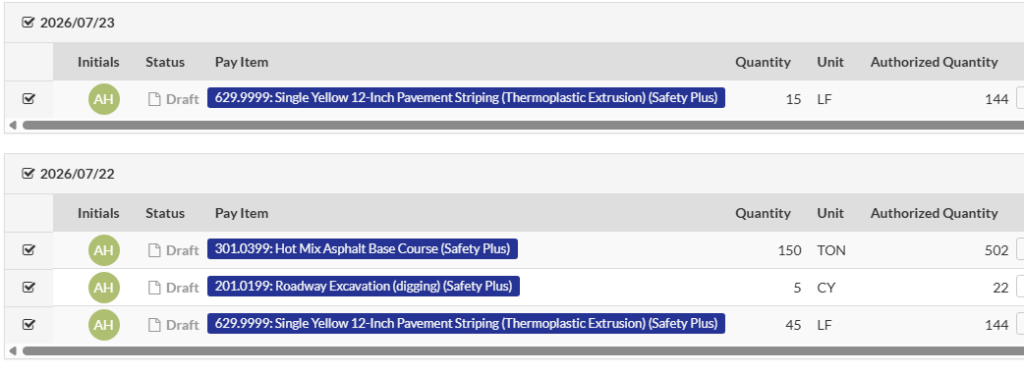
- Click Create Document in the lower right toolbar.
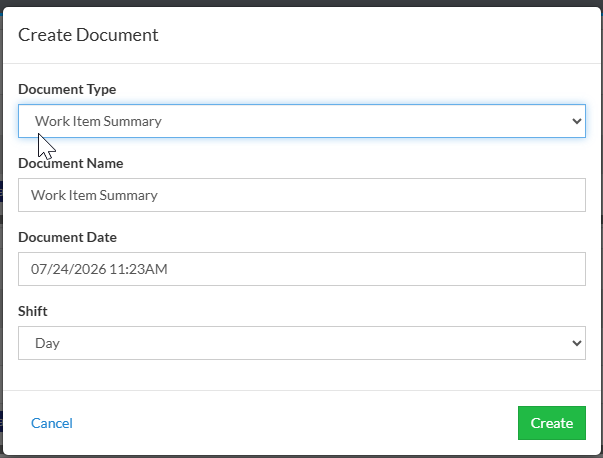
- Change the Document Type to Work Item Summary and then click Create.
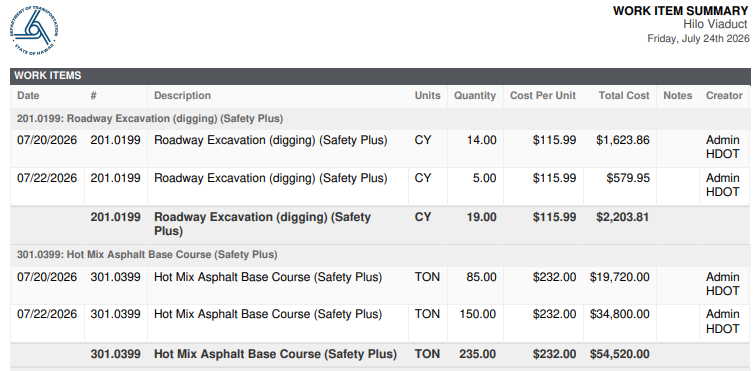
- If you open the PDF of this report you’ll see the summary of total quantities, cost per unit, and total costs of the items included.
If you would like to use this report format but cannot find it on your project you can reach out to Craig (craig.weiland@headlight.com) for assistance.
6. HDOT Wiki Updates
As part of our mission to make the HDOT Wiki site the best possible resource for all of us, we have worked to update it with all the latest information and resources. New pages have been added and old pages are being kept up-to-date. Here are some of the new pages that have been added since the last newsletter:
To access these resources, you must have an account with the appropriate role on the Wiki. As a security measure, the registration page requires a password to access. To request the password, please email econ@qrse.com with a message containing your name, company, and role from the following:
- Project Engineer
- Inspector
- Surveyor
- Planning
- Design
- Contractor
- O&M
- Resident Engineer / Construction Manager
If necessary, you can pick multiple roles that are relevant to your work. After we confirm your request, we will send you the password to use here: https://hdot.wiki/register/
After entering the password, follow the prompts and enter your information. We will then approve your account and you will have access.
For more information on navigating the Wiki and finding the resources you need, please refer to this video: How to Navigate Through the HDOT Wiki
Thank you for reading, and see you in the next newsletter!