
Aloha and Happy New Year All,
Welcome to the January 2026 E-Construction Newsletter! In this edition, we’re sharing key reminders, newly released tools, and updated workflows designed to streamline your day-to-day tasks. Keep reading for the latest updates from our core platforms and upcoming training opportunities to support your work.
- Recent Trainings/Office Hours
- E-Construction Project Onboarding
- Autodesk Construction Cloud Updates
- Haulhub Updates
- HeadLight Updates
- HDOT Wiki Site Updates
1. Recent Trainings/Office Hours
Find all of the latest training recordings and slide decks here:
If you are not invited to the office hours meeting invite for the above trainings, please reach out to econ@qrse.com.
Are there any specific topics you’d like to focus on more during office hours? If so, please fill out the form here!
2. E-Construction Onboarding for New Projects
For ACC, projects should be created by the design project manager and be handed off to the construction project manager/engineer at the beginning of the construction phase. If at the construction phase there has not been a project created yet, you can still follow this step-by-step guide to create it in ACC. For any members that need to be added/removed, have them contact the PM/PE to be added.
For HeadLight, new projects should be requested through HeadLight’s project intake form here. To add/remove members to a project, send an email to support@headlight.com with your name, email address, role, and project that you want to be added to. Be sure to CC the PM/PE on the email request.
For HaulHub, new projects in EDOT should be requested through the project creation form here. You should also remind the prime Contractor on your job that they need to create the project in their portal. In addition to that, the Contractor should have the supplier reach out to alex.richardson@haulhub.com to get onboarded to Haulhub’s supplier system (if not already onboarded). All projects must be using Haulhub to track material tickets.
REMINDER: Please reach out to the e-construction support email (econ@qrse.com) if live onboarding training is needed for a specific project.
3. Autodesk Construction Cloud (ACC) Updates
- Updates From January 2026
- Build
- Project Management
- Submittals | Download all Attachments – Select Download all from the attachment download dropdown to export all attachments from a workflow participant in a single ZIP file.
- Meetings | Reference to Specifications – Specification sections can now be added as a reference to a meeting.
- Correspondence | Reference to Specifications – Specification sections can now be added as a reference to a correspondence.
- Field Management
- Issues | Enhanced Company Issues Filter – Web – Members can now filter issues by company, including those assigned to individual team members within that group. Learn more.
- Issues | Thumbnails for 2D Issues – Snapshots of 2D issue pins are now automatically captured to provide visual context, similar to 3D issues. Thumbnails are generated when an issue is placed or moved, and members can manually add snapshots for legacy or error issues.
- Autodesk AI
- Autodesk AI | Autodesk Assistant: Help Content – The Autodesk Assistant now provides quick access to ACC product help content. With the Help Content agent, members can ask questions and receive instant answers without leaving their workflow or searching the help site.
- Project Management
- Docs
- Document Management
- Files | Naming Standard Excel Import Error Table – Members who attempt to import an Excel naming standard can now review a detailed table if errors are detected. The table specifies each error and provides guidance on how to resolve them before attempting the import again.
- Files | Manage Markup Changes by File Version and Review Status – You can now control when published markups can be edited based on file version or review status. This helps protect approved and issued information from unintended changes.
- Reviews | Add References to a Review – Reviewers or the initiators can add references to a review, such as forms, files, or other reviews, to provide more context for a specific review.
- Reviews | Edit Name of a Closed Review – Project administrators can edit the name of a review even after it’s closed. This makes it easier to standardize review names and keep review data consistent across a project.
- Reviews | Allow Initiators to Edit Approvers – Project administrators can enable the option Allow Initiators to edit the approvers in approval workflows. If the setting is enabled, reviews created from the approval workflow will allow the initiator to edit the approver.
- Reviews | Change Target Folder During a Review – Project administrators can now change the target folder even after the review has started. Initiators can also change the target folder during a review if the option Allow the initiator to change the target folder is enabled in the approval workflows.
- Reviews | More Review Auto-Trigger Conditions and Logic – When creating a review auto-trigger, Review status and File type system attributes are now available as auto-trigger conditions. Is and Is not empty are available as auto-trigger condition logic.
- Document Management
- Insight
- Dashboards
- Dashboards | ACC My Home – Surface items assigned to roles and companies – The “Assigned to Me” card on My Home now includes items assigned to a member’s company or role, in addition to those assigned directly to the member. This provides a more complete view of responsibilities.
- Dashboards | Quality KPI dashboard – Project teams can now access a centralized Quality KPI dashboard in Project Home. The dashboard shows issue trends and includes interactive filters and drill-down options for deeper analysis. Learn more.
- Dashboards
- Build
This is just a small selection of the recent updates to ACC. For a full list of recent updates to ACC and other resources, visit the official help website.
4. Haulhub Updates
Aloha HDOT Team,
Welcome to the Haul Hub Newsletter—your one-stop source for e-Ticketing updates, portal enhancements, and expert tips to streamline your EDOT experience!
Our mission? To keep you informed, empowered, and connected as we drive e-Ticketing adoption across the islands. This newsletter is yours, so we’d love your input—what topics or features would you like to see? Share your ideas with us!
🚀 Supplier Integration Highlights
Big mahalo to our 9 onboarded suppliers:
✔ Grace Pacific
✔ HC&D
✔ Hawaiian Cement
✔ Halawa Asphalt
✔ Hawaii Paving
✔ Island Ready Mix
✔ Kauai AC Plant
✔ Maui Asphalt
✔ Makakilo Quarry 2
📌 Coming Soon: Jas Glover, Kauai Concrete, and Yamada & Sons are next in line! If your project uses a supplier not yet integrated, let us know—it helps us prioritize.
Calling All Contractors!
We need your help to ensure projects get calibrated! Several suppliers have expressed a preference for having contractors handle this process.
Below is a list of projects where outreach to the contractor (Prime/Sub) has been unsuccessful. If your company is listed, please prioritize calibrating these projects as soon as possible.
If you have any questions or need support, feel free to reach out to Alex and Chord.

📊 EDOT by the Numbers
(Jan 1, 2024 – October 31, 2025)
✅ 20,474 Total Tickets Processed
✅ 31 Projects Calibrated
✅ 205 Inspectors in HDOT Portal
✅ 9 Suppliers Actively Sending Data
Material Breakdown:
🔹 HMA: 15,074 (73.63%)
🔹 RMC: 3,166 (15.46%)
🔹 AGG: 1368 (6.68%)
🛠️ New & Noteworthy: Let’s gear up for 2026! As we head into the new year, we wanted to re-focus on the fundamentals to ensure everyone is prepared. Here is a link to our 5-minute tutorial on the basics of your EDOT portal [Inspector App Basics].
📣 Your Voice Matters
Have questions or suggestions? Want to highlight a win or challenge? We’re all ears! Drop us a line or join our next feedback session.
Thank you for a great season!
We want to extend a sincere thank you to everyone who played a role in pushing project implementation forward this season. Your engagement, responsiveness, and commitment made a meaningful impact and helped keep momentum strong across the program. We truly appreciate the collaboration and look forward to building on this progress together in the months ahead.
Mahalo for being part of the e-Ticketing ‘ohana. Have a fantastic Holiday Season!
5. HeadLight Updates
Recent Update
We have updated the Progress Payments column for Authorized Quantity to only show the quantities to two decimals. It previously was showing eight digits after the decimal.
Lesser Known Spreadsheet Functions
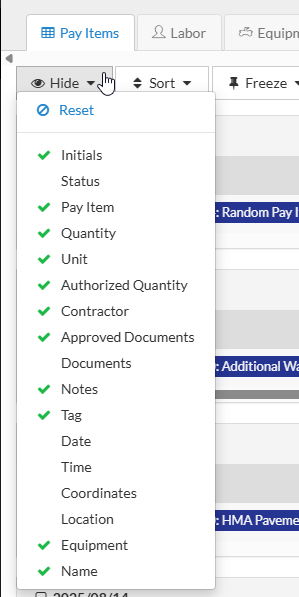
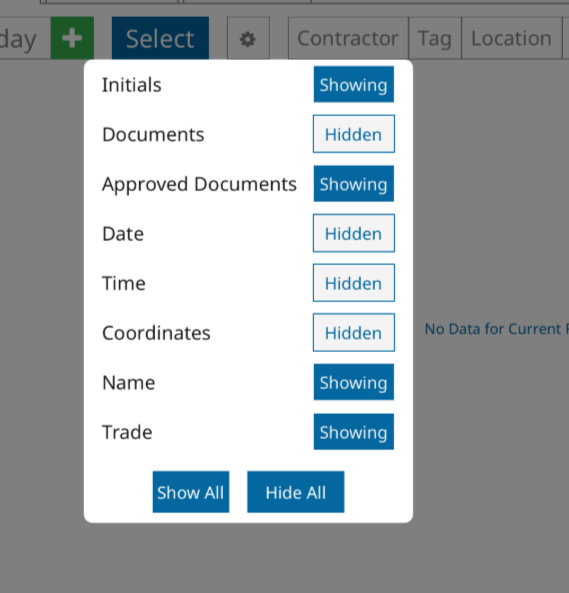
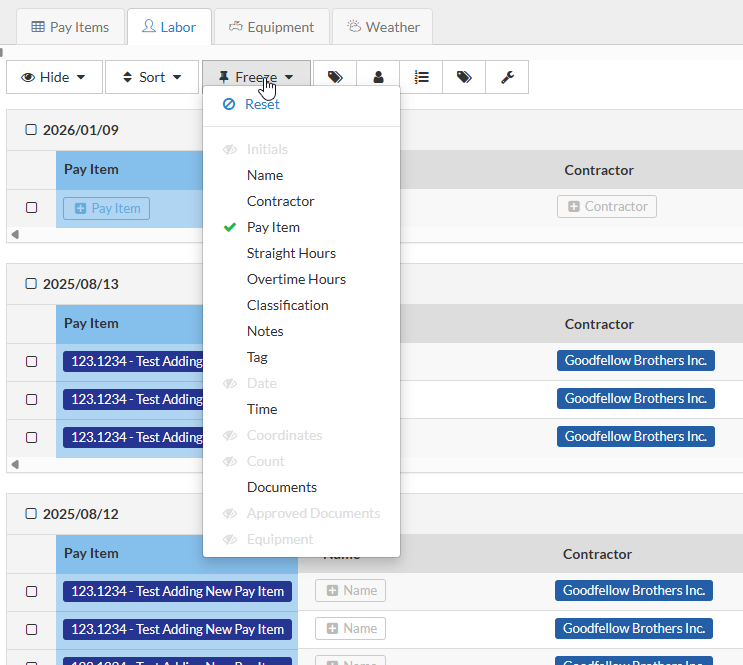
On each spreadsheet you can show or hide different columns that are available. This can help keep spreadsheet sizes more manageable if there are columns you don’t need. Changing these views are personal and will not affect any other users and you can always turn columns back on or off later. On the web version of Fieldbook, there is a hide button to click. On the iPad this is controlled by a little gear icon.
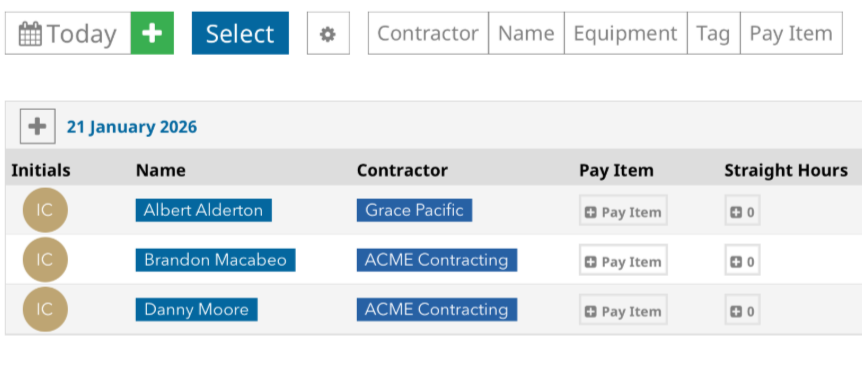
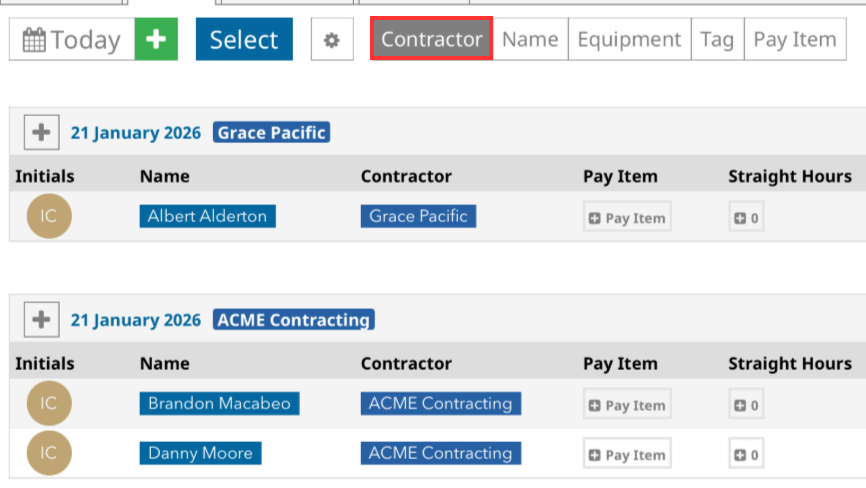
To the right of these column adjustment tools are some buttons that allow you to sort your spreadsheets based on the different label types available on each spreadsheet. Here you can see I have separated the Personnel spreadsheet by Contractor. The three personnel observations were grouped by date, but now they are grouped by date and contractor. You can do similarly sort by Pay Item.
On the web version of Fieldbook there are a few additional spreadsheet organization tools that allow you to Sort or Freeze columns
6. HDOT Wiki Updates
As we are continuing to adjust to the new Wiki site, we have worked to update it with all the latest information and resources. New pages have been added and old pages are being kept up-to-date. Here are some of the new pages that have been added since the last newsletter:
- Rain Gauge Tracking (Inspector, Engineer)
- Coordinating Section 106 and Section 4(f)
- Creating Labels for New Headlight Projects
- HDOT Project Engineer Checklist (Engineer)
To access these resources, you have an account with the appropriate role on the Wiki. As a security measure, the registration page requires a password to access. To request the password, please email econ@qrse.com with a message containing your name, company, and role from the following:
- Project Engineer
- Inspector
- Surveyor
- Planning
- Design
- Contractor
- O&M
- Resident Engineer / Construction Manager
If necessary, you can pick multiple roles that are relevant to your work. After we confirm your request, we will send you the password to use here: https://hdot.wiki/register/
After entering the password, follow the prompts and enter your information. We will then approve your account and you will have access.
For more information on navigating the Wiki and finding the resources you need, please refer to this video: How to Navigate Through the HDOT Wiki
See you in February for the next newsletter!