
Aloha,
Welcome to the March 2026 E-Construction Newsletter! In this edition, we’re sharing key reminders, newly released tools, and updated workflows designed to streamline your day-to-day tasks. Keep reading for the latest updates from our core platforms and upcoming training opportunities to support your work.
- 2025 Kokua Reviews
- Recent Trainings/Office Hours
- E-Construction Project Onboarding
Autodesk Construction Cloud→ Autodesk Forma Updates- Haulhub Updates
- HeadLight Updates
- HDOT Wiki Site Updates
1. 2025 Kokua Reviews
We’ve officially completed the 2025 Kokua audits across all projects, and grading has now been finalized. Each project will find its individual summary sheet uploaded in Autodesk Forma under Files → 2025 Kokua Review. If you have any questions about your project’s results, please don’t hesitate to reach out to us at econ@qrse.com.
2. Recent Trainings/Office Hours
- Material Submission Workflow
- Force Account Reporting
- Weekly Statement of Working Days (WSWD)
- Relief of Maintenance (ROM)
Find all of the latest training recordings and slide decks here:
If you are not invited to the office hours meeting invite for the above trainings, please reach out to econ@qrse.com.
Are there any specific topics you’d like to focus on more during office hours? If so, please fill out the form here!
3. E-Construction Onboarding for New Projects
For Autodesk Forma, projects should be created by the construction project manager/engineer at the beginning of the construction phase. If at the construction phase there has not been a project created yet, you can still follow this step-by-step guide to create it in Autodesk Forma. For any members that need to be added/removed, have them contact the PM/PE to be added.
For HeadLight, new projects should be requested through HeadLight’s project intake form here. To add/remove members to a project, send an email to support@headlight.com with your name, email address, role, and project that you want to be added to. Be sure to CC the PM/PE on the email request.
For HaulHub, new projects in E-DOT should be requested through the project creation form here. You should also remind the prime Contractor on your job that they need to create the project in their portal. In addition to that, the Contractor should have the supplier reach out to alex.richardson@haulhub.com to get onboarded to Haulhub’s supplier system (if not already onboarded). All projects must be using E-DOT to track material tickets.
REMINDER: Please reach out to the e-construction support email (econ@qrse.com) if live onboarding training is needed for a specific project.
4. Autodesk Construction Cloud → Autodesk Forma Updates
Autodesk Construction Cloud (ACC) is being renamed to Autodesk Forma as of March 24!
What’s Changing:
- ACC logo will change to Autodesk Forma
- Docs will appear as Data Management
- Navigation to other Forma solutions will surface
- ACC Mobile App will be re-named to Forma
What’s Not Changing:
- No changes to URLs or logins
- No changes to workflows or automations setup in ACC
- No data migration. All projects, members, settings and data remains as is
New Branding:
Autodesk Docs will be renamed to Forma Data Management, serving as the common data environment across the Forma industry cloud. Additionally, several existing product names will be updated to reflect their inclusion in Forma. Beginning March 24, these new names will appear across the HDOT Autodesk website and HDOT Wiki. No action is required from you.
- Autodesk Docs → Forma Data Management
- Autodesk Build → Forma Build
FAQs Answered by Autodesk:
Will there be changes to current ACC product capabilities, modules, or workflows?
No, there will be no disruption to how existing customers access or use ACC products. Licensing, subscriptions, files, permissions, folder structures, and current connections to other ACC products like BuildingConnected will remain intact. Additionally, any automations, integrations or APIs currently in place will not be affected. And, importantly, there will be no data migration required for current ACC or Forma customers. A single, common data environment and platform across AECO will enable improved data flow across the project lifecycle and introduce more AI-native workflows.
Will the ACC mobile app change in any way?
Outside of branding, we do not expect any changes to the mobile app. Functional updates will continue to be released as previously planned in accordance to our roadmap, ensuring ongoing improvements without disruption to the user experience.
Will the ACC user interface change or look different?
The core functionality and layout of the ACC user interface will remain consistent, ensuring a smooth experience for existing users. There will be new Forma branding introduced and we will continue to deliver updates to the user experience as part of ongoing improvements to the product.
The above is an excerpt from Autodesk Forma’s official announcement regarding the rebrand. If you are interested, you may read the full announcement at this link.
5. Haulhub Updates
Aloha HDOT Team,
Welcome to the 2026 March edition of the Haul Hub Newsletter—your one-stop source for e-Ticketing updates, portal enhancements, and expert tips to streamline your EDOT experience!
Our mission? To keep you informed, empowered, and connected as we drive e-Ticketing adoption across the islands. This newsletter is yours, so we’d love your input—what topics or features would you like to see? Share your ideas with us!
🚀 Supplier Integration Highlights
Big mahalo to our 9 onboarded suppliers:
✔ Grace Pacific
✔ HC&D
✔ Hawaiian Cement
✔ Halawa Asphalt
✔ Hawaii Paving
✔ Island Ready Mix
✔ Kauai AC Plant
✔ Maui Asphalt
✔ Makakilo Quarry 2
📌 Coming Soon: Jas Glover, Kauai Concrete, and Yamada & Sons are next in line! If your project uses a supplier not yet integrated, let us know—it helps us prioritize.
Calling All Projects!
We have 14 projects receiving data in 2026 so far. The question is, what are we missing? Please send us a ticket scan from any of your projects that’s not receiving e-Tickets, and we can work on getting the data.
If you have any questions or need support, feel free to reach out to Alex and Chord.
📊 EDOT by the Numbers
(Jan 1, 2025 – February 28, 2026)
✅ 10,574 Total Tickets Processed
✅ 26 Projects Calibrated
✅ 215 Inspectors in HDOT Portal
✅ 9 Suppliers Actively Sending Data
Material Breakdown:
🔹 HMA: 5,528 (52.28%)
🔹 RMC: 2,891 (27.34%)
🔹 AGG: 1354 (12.8%)
🛠️ : Let’s push things forward in 2026! One of our key goals this year is to ensure that at least 95% of e-Tickets are inspected across all projects. We’ll be reaching out to project offices to see how we can help ensure this goal is met. If you’d like to set up a training to discuss, feel free to reach out to me at alex.richardson@haulhub.com to schedule a day/time. Or you can use this link to visit our online learning portal [Haul Hub University] with video tutorials on DOT e-Ticketing.
📣 Your Voice Matters
Have questions or suggestions? Want to highlight a win or challenge? We’re all ears! Drop us a line or join our next feedback session.
We can’t do this without you!
Team, thank you for the effort you’ve already put into advancing this program. As we move through the year, every ticket reviewed and every status updated helps us build a more transparent and efficient process for everyone involved.
Your engagement is what makes this work. Let’s keep pushing forward and make this our strongest year yet.
Mahalo for being part of the e-Ticketing ‘ohana.
6. HeadLight Updates
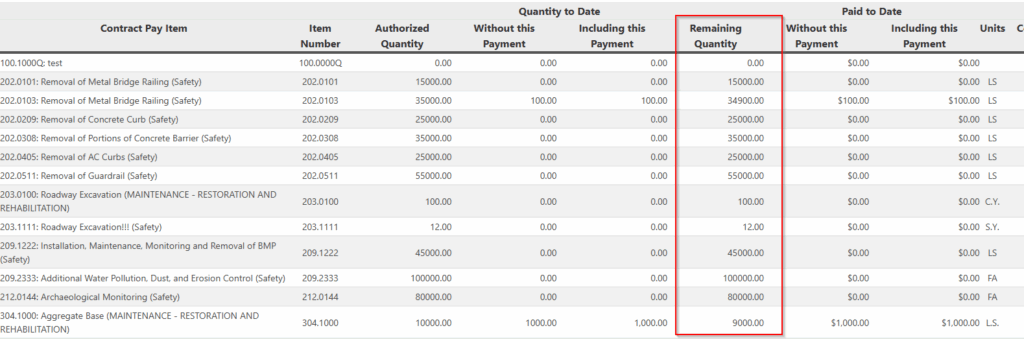
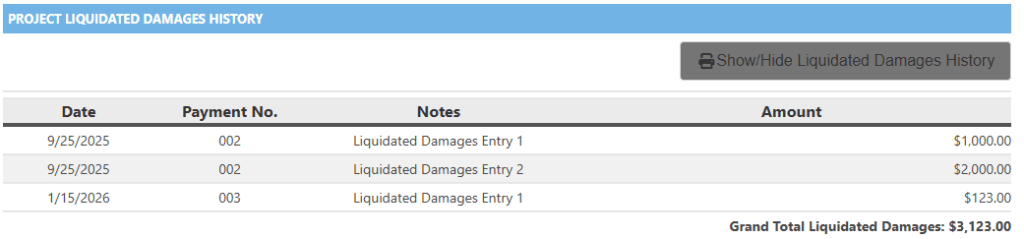
Headlight has recently made some updates to Progress Payments to make information more clear and to allow engineers to track the quantities more easily.
Added Remaining Quantity Column
Updated Liquidated Damages
- Added Liquidated Damages History section, listing previously charged LDs and what payment they were included in
- Liquidated Damages that are not tied to a specific pay item no longer appear in the fiscal table drill-down
- Removed “Total Reversed Liquidated Damages” to prevent confusion
7. HDOT Wiki Updates
As part of our mission to make the HDOT Wiki site the best possible resource for all of us, we have worked to update it with all the latest information and resources. New pages have been added and old pages are being kept up-to-date. Here are some of the new pages that have been added since the last newsletter:
We have also updated the Wiki to reflect the Autodesk Forma rebranding.
To access these resources, you must have an account with the appropriate role on the Wiki. As a security measure, the registration page requires a password to access. To request the password, please email econ@qrse.com with a message containing your name, company, and role from the following:
- Project Engineer
- Inspector
- Surveyor
- Planning
- Design
- Contractor
- O&M
- Resident Engineer / Construction Manager
If necessary, you can pick multiple roles that are relevant to your work. After we confirm your request, we will send you the password to use here: https://hdot.wiki/register/
After entering the password, follow the prompts and enter your information. We will then approve your account and you will have access.
For more information on navigating the Wiki and finding the resources you need, please refer to this video: How to Navigate Through the HDOT Wiki
Thank you for reading, and see you in the next newsletter!