
Aloha All,
Welcome to the December 2025 E-Construction Newsletter! In this edition, we’re sharing key reminders, newly released tools, and updated workflows designed to streamline your day-to-day tasks. Keep reading for the latest updates from our core platforms and upcoming training opportunities to support your work.
- Recent Trainings/Office Hours
- E-Construction Project Onboarding
- Autodesk Construction Cloud Updates
- Haulhub Updates
- HeadLight Updates
- HDOT Wiki Site Updates
1. Recent Trainings/Office Hours
Find all of the latest training recordings and slide decks here:
If you are not invited to the office hours meeting invite for the above trainings, please reach out to econ@qrse.com.
Are there any specific topics you’d like to focus on more during office hours? If so, please fill out the form here!
2. E-Construction Onboarding for New Projects
For ACC, projects should be created by the design project manager and be handed off to the construction project manager/engineer at the beginning of the construction phase. If at the construction phase there has not been a project created yet, you can still follow this step-by-step guide to create it in ACC. For any members that need to be added/removed, have them contact the PM/PE to be added.
For HeadLight, new projects should be requested through HeadLight’s project intake form here. To add/remove members to a project, send an email to support@headlight.com with your name, email address, role, and project that you want to be added to. Be sure to CC the PM/PE on the email request.
For HaulHub, new projects in EDOT should be requested through the project creation form here. You should also remind the prime Contractor on your job that they need to create the project in their portal. In addition to that, the Contractor should have the supplier reach out to alex.richardson@haulhub.com to get onboarded to Haulhub’s supplier system (if not already onboarded). All projects must be using Haulhub to track material tickets.
REMINDER: Please reach out to the e-construction support email (econ@qrse.com) if live onboarding training is needed for a specific project.
3. Autodesk Construction Cloud (ACC) Updates
- Updates From November 2025
- Build
- Project Management
- RFIs | Reference to Workplan – Add a plan task as a reference from within the RFI reference picker.
- RFIs | Support Sheets References in Bridged RFIs – Bridged RFIs now include Sheets references. When an RFI is Bridged, any Sheets references will be copied over to the bridged project.
- Submittals | Add as a Reference on Mobile – Adding a Submittal as a reference is now supported while on mobile iOS and Android.
- Workplan | Task Commitments – A new Commit option allows assignees to commit to tasks they are responsible for, confirming ownership and locking the assignee and date fields. Committed task dates can only be edited by Managers through Replanning, which requires the selection of a root cause and documents the change.
- Workplan | Task Metrics – In a new Metrics dashboard, committed task data is used to generate charts to track task execution and measure plan performance, including Plan Percent Complete and Root Cause Analysis charts.
- Workplan | Ease of Use Improvements – The lookahead has been shortened to display 6-week view at a time, focusing on what is most important in the short term. When selecting handoffs, there will only be the option to select future handoffs.
- Field Management
- Forms | Custom Tables – Forms now support custom tables for flexible data capture. Create custom tables with unlimited rows, configurable columns, and data fields including signature, time, and date.
- Forms | Copy Form Template to Projects – Library form templates can be saved as a copy to a project, where the template can be edited to allow for project-specific data collection.
- Issues | Reference Issues to Issues on Mobile – Teams can now reference one issue to another directly from their mobile devices. Previously available only on web, this update makes it easier for crews to connect related issues while on the jobsite.
- Issues | Collapse/Expand Empty Fields – Empty fields in issue details are now collapsed by default, improving review efficiency for field teams. Users can toggle to view all fields, including empty ones, and the system will remember this preference. This update supports custom fields and dynamically reorders the layout based on field content.
- Issues | Closed Issues Download/Sync Behavior Change on Mobile – Closed issues no longer automatically download and sync to mobile devices on iOS and Android. This change improves app performance and reduces data usage for users who don’t need access to closed issues while in the field. Members can still manually download closed issues if needed.
- Project Management
- Docs
- Files | Bulk Upload Tool – Members can use the Bulk Upload Tool to upload large local project folders and files directly to the Files tool while preserving the folder structure. The tool also supports uploading Civil 3D and AutoCAD local project folders and files the Files tool while maintaining their referenced files. See About the Bulk Upload Tool for more information.
- Issues | Reference Issues to Issues on Mobile – Teams can now reference one issue to another directly from their mobile devices. Previously available only on web, this update makes it easier for teams to connect related issues on the jobsite.
- Issues | Closed Issues Download/Sync Behavior Change on Mobile – Closed issues no longer automatically download and sync to mobile devices on iOS and Android. This change improves app performance and reduces data usage for users who don’t need access to closed issues while in the field. Members can still manually download closed issues if needed.
- Issues | Issue Details Collapse/Expand Empty Fields – Improve issue review efficiency by showing only filled-in fields by default. Users can toggle to view empty fields, and the system remembers their preferred view. Supports custom fields and reorders layout based on field content.
- Packages | Add Files to Multiple Packages – Project administrators and package managers can now select multiple packages as when adding files from the file list, viewer, or version history.
- Reviews | Review Auto-Triggers – Project administrators can automate review workflows by setting trigger actions and conditions based on attributes on folders in the Files tool. When a file matches the selected trigger actions and the conditions, a review is created automatically. Once a review is completed, updated attributes can kick off the next step—keeping document workflows connected without manual effort. See Automatically Trigger Reviews from Files for more information.
- Transmittal | Transmit with File Attributes – Members can now include file attribtues when creating transmittals, making it easier to share files with additional context. Project administrators can create attribute groups that define which attributes are added to each transmittal. Senders can simply select the relevant group during creation to include all the attributes contained in the group.
- Build
This is just a small selection of the recent updates to ACC. For a full list of recent updates to ACC and other resources, visit the official help website.
4. Haulhub Updates
Aloha HDOT Team,
Welcome to the December edition of the Haul Hub Newsletter—your one-stop source for e-Ticketing updates, portal enhancements, and expert tips to streamline your EDOT experience!
Our mission? To keep you informed, empowered, and connected as we drive e-Ticketing adoption across the islands. This newsletter is yours, so we’d love your input—what topics or features would you like to see? Share your ideas with us!
🚀 Supplier Integration Highlights
Big mahalo to our 9 onboarded suppliers:
✔ Grace Pacific
✔ HC&D
✔ Hawaiian Cement
✔ Halawa Asphalt
✔ Hawaii Paving
✔ Island Ready Mix
✔ Kauai AC Plant
✔ Maui Asphalt
✔ Makakilo Quarry 2
📌 Coming Soon: Jas Glover, Kauai Concrete, and Yamada & Sons are next in line! If your project uses a supplier not yet integrated, let us know—it helps us prioritize.
Calling All Contractors!
We need your help to ensure projects get calibrated! Several suppliers have expressed a preference for having contractors handle this process.
Below is a list of projects where outreach to the contractor (Prime/Sub) has been unsuccessful. If your company is listed, please prioritize calibrating these projects as soon as possible.
If you have any questions or need support, feel free to reach out to Alex and Chord.

📊 EDOT by the Numbers
(Jan 1, 2024 – October 31, 2025)
✅ 20,474 Total Tickets Processed
✅ 31 Projects Calibrated
✅ 205 Inspectors in HDOT Portal
✅ 9 Suppliers Actively Sending Data
Material Breakdown:
🔹 HMA: 15,074 (73.63%)
🔹 RMC: 3,166 (15.46%)
🔹 AGG: 1368 (6.68%)
🛠️ New & Noteworthy: Let’s gear up for 2026! As we head into the new year, we wanted to re-focus on the fundamentals to ensure everyone is prepared. Here is a link to our 5-minute tutorial on the basics of your EDOT portal [Inspector App Basics].
📣 Your Voice Matters
Have questions or suggestions? Want to highlight a win or challenge? We’re all ears! Drop us a line or join our next feedback session.
Thank you for a great season!
We want to extend a sincere thank you to everyone who played a role in pushing project implementation forward this season. Your engagement, responsiveness, and commitment made a meaningful impact and helped keep momentum strong across the program. We truly appreciate the collaboration and look forward to building on this progress together in the months ahead.
Mahalo for being part of the e-Ticketing ‘ohana. Have a fantastic Holiday Season!
5. HeadLight Updates
We are making changes to the Progress Payment form to break out the payment by Funding Categories (Type Code) for the Fiscal team to be able to see these summaries. We are making updates behind the scenes to contracts in HeadLight to be able to display this information correctly. For participating projects, these codes should match the Improvement Type Codes, as defined by the FHWA. Here are screenshots of how the Fiscal Table should look when activated in HeadLight and an example of the Type Codes from FHWA.
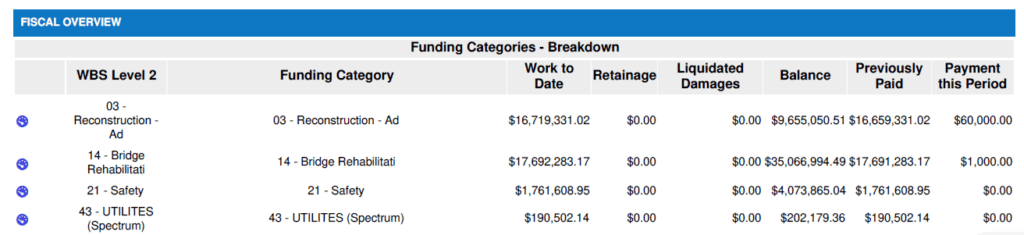
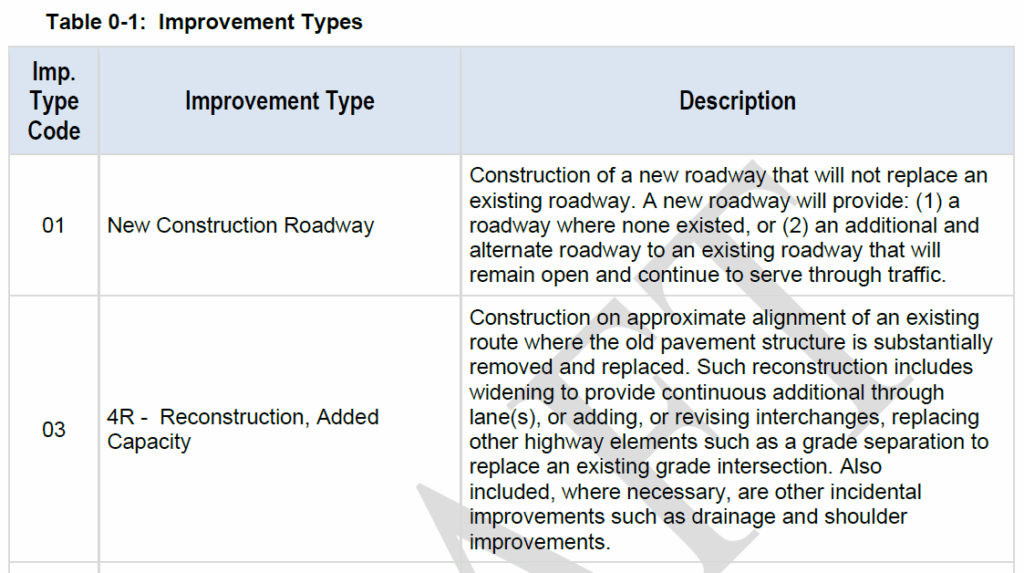
If you notice this new section on an upcoming payment and the information does not look correct, please contact support@headlight.com and eCon@qrse.com. You should not need to do anything differently when completing the payment in HeadLight for this Fiscal Overview. We are completing some final changes before activating the feature on the production server.
We will be updating the HeadLight project setup form to include these Type Codes in the Pay Item Template for upload as well.
6. HDOT Wiki Updates
As we are continuing to adjust to the new Wiki site, we have worked to update it with all the latest information and resources. New pages have been added and old pages are being kept up-to-date. Here are some of the new pages that have been added since the last newsletter:
- Conservation District Use Permit
- HRS Chapter 195D – Conservation of Aquatic Life, Wildlife, and Land Plants
- Hazardous Materials
- Noise Permits and Variances
- Stream Permitting
- Stormwater for HDOT Projects
- Section 401 of the Clean Water Act – Water Quality Certification
- Hawaii Coastal Zone Management (CZM) Program
- HRS 6E – Historic Preservation
- HRS 343 – Environmental Impact Statement
- Traffic Emergency Zone (TEZ)
To access these resources, you have an account with the appropriate role on the Wiki. As a security measure, the registration page requires a password to access. To request the password, please email econ@qrse.com with a message containing your name, company, and role from the following:
- Project Engineer
- Inspector
- Surveyor
- Planning
- Design
- Contractor
- O&M
- Resident Engineer / Construction Manager
If necessary, you can pick multiple roles that are relevant to your work. After we confirm your request, we will send you the password to use here: https://hdot.wiki/register/
After entering the password, follow the prompts and enter your information. We will then approve your account and you will have access.
For more information on navigating the Wiki and finding the resources you need, please refer to this video: How to Navigate Through the HDOT Wiki
Stay tuned for more details in the upcoming newsletter!